


Your marketing guide to Empack Madrid 2026 starts here!
We know that preparing for a trade show can be complicated…
That’s why we’ve created a short guide to help you get started with completing your online profile, accessing your “My Easyfairs” account, and making the most of the EasyGo Marketing Pack included in your participation.
You can also contact us with any questions regarding your stand operations (extras, electricity, technical floor plan, graphics, etc.) by emailing us at: empack.operaciones@easyfairs.com
Want to stand out?
Take part in the Live Tours and ESG Exhibitor Awards
*Included in your EasyGo pack.
To make things easier for you, we’ve put together a checklist of all the key dates so you can keep everything under control.
And just in case you need it, here is the shop and operations furniture schedule.
May
From now on
Fill in the details that will appear on the fair’s website via your MyEasyfairs profile.
Tip: to see how it looks, go to the Empack website and look for your profile in the exhibitor catalogue.
JUNE
The first week of June is all yours!
This year, you’ll be able to invite your contacts EXCLUSIVELY before anyone else until 8 June.
On 8 June itself, the organisers will announce the opening of visitor registration.
JULY
Don't miss out!
Submit your application for
THE ESG AWARDS and LIVE TOURS using the forms.
Deadline: 8 OCTOBER
septiembre
– You will receive your first personalised digital invitation featuring your company logo, stand details and a personal registration link, which you can send to your contacts.
– Get Started meeting: 15 September
– Remind your contacts that you will be attending so they can save the date.
octubre
– You will receive your second personalised digital invitation featuring your company logo, stand details and a personal registration link, which you can send to your contacts.
– 8 OCTOBER: Deadline for Live Tours and ESG AWARDS entries.
november
Invite your contacts and register your stand staff.
MAY
- Completar la información que aparecerá en la web de la feria a través de vuestro perfil deMy Easyfairs.
- Contratar material mobiliario, aire comprimido, potencia eléctrica...
JUNIO
- Ya podéis obtener las acreditaciones del personal que estará presente en el stand.
JULIO
- Candidatura paraTHE MOST SUSTAINABLE EXHIBITOR AWARD y LIVE TOURSA través de los formulario que os enviaremos próximamente por email.
Fecha límite para realizar candidatura: 8 OCTUBRE
SEPTIEMBRE
- Recibiréis vuestra 1ª invitación digital personalizada con el logotipo de vuestra empresa,stand y link de registro personal para que podáis enviar a vuestros contactos.
- Reunión Get Started: 15 septiembre
OCTUBRE
- Recibiréis vuestra 2ª invitación digital personalizada con el logotipo de vuestra empresa,stand y link de registro personal para que podáis enviar a vuestros contactos.
- 8 OCTUBRE: Deadline para candidaturas Live Tours y ESG AWARDS.
NOVIEMBRE
- Último día para linkar tu/s lector/es Poken a algún producto específico de tu empresa.(Puedes hacerlo a través de MyEasyfairs).
The first thing you need to do is log in to My Easyfairs. My Easyfairs is a microsite
where you can manage most aspects of your participation.
Log in to your My Easyfairs account via this link
· If you took part in the last edition, use the same username (your email address) and the same password. If
you can’t remember it, click on “Forgot my password”
·If this is your first time taking part in an Easyfairs event, you need to activate your account. Follow these
simple steps:
- We have sent you an email to activate your My Easyfairs account (when you booked your
participation). Simply click on ACTIVATE ACCOUNT. If you haven’t received it or can’t find it, contact madrid@easyfairs.com and we will resend it to you. - Enter your first name, surname and choose a password
- You will receive an email to verify your account
- Once your account has been created, you can access My Easyfairs via the event website.
You will find the login at the top right of the website or via this link. To log in, use your username
(email) and the password you have just created.
Complete your profile on MyEasyfairs and ensure you’re visible
Your profile on MyEasyfairs will appear in our Empack Madrid exhibitor directory and will be the first impression a potential lead has of your company.
- If you do not complete your profile, you will appear with no information
(i.e. no description, no products and no content).
- All you need to do is fill in:
- Company details (name, website, contact details, etc.)
- Company description
- Logo and images
- Products
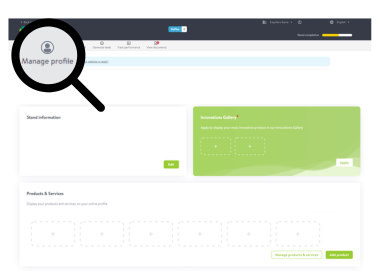
Please note: You must complete the information in both Spanish and English for your profile to be validated.
Marketing tools
A large part of the success of your participation at the trade show depends on something very important: promoting your presence and inviting your contacts.
The more clients and potential visitors know that you will be exhibiting, the more visits you will receive at your stand and the more business opportunities you will generate.
Additionally, since you have an EasyGo package included, it’s even easier for you!
The sooner you start inviting people, the better results you will achieve.
BANNERS
Add them to your email signature, use them in newsletters, post them on your website or social media, or include them in email campaigns…
💡 Tip: Always add your personalised link to track results
REGISTRATION LINK
Your most important tool. You can customise it via MyEasyfairs with: Your logo, a personalised message
✅ It will let you know who is registering and help you generate leads before the event
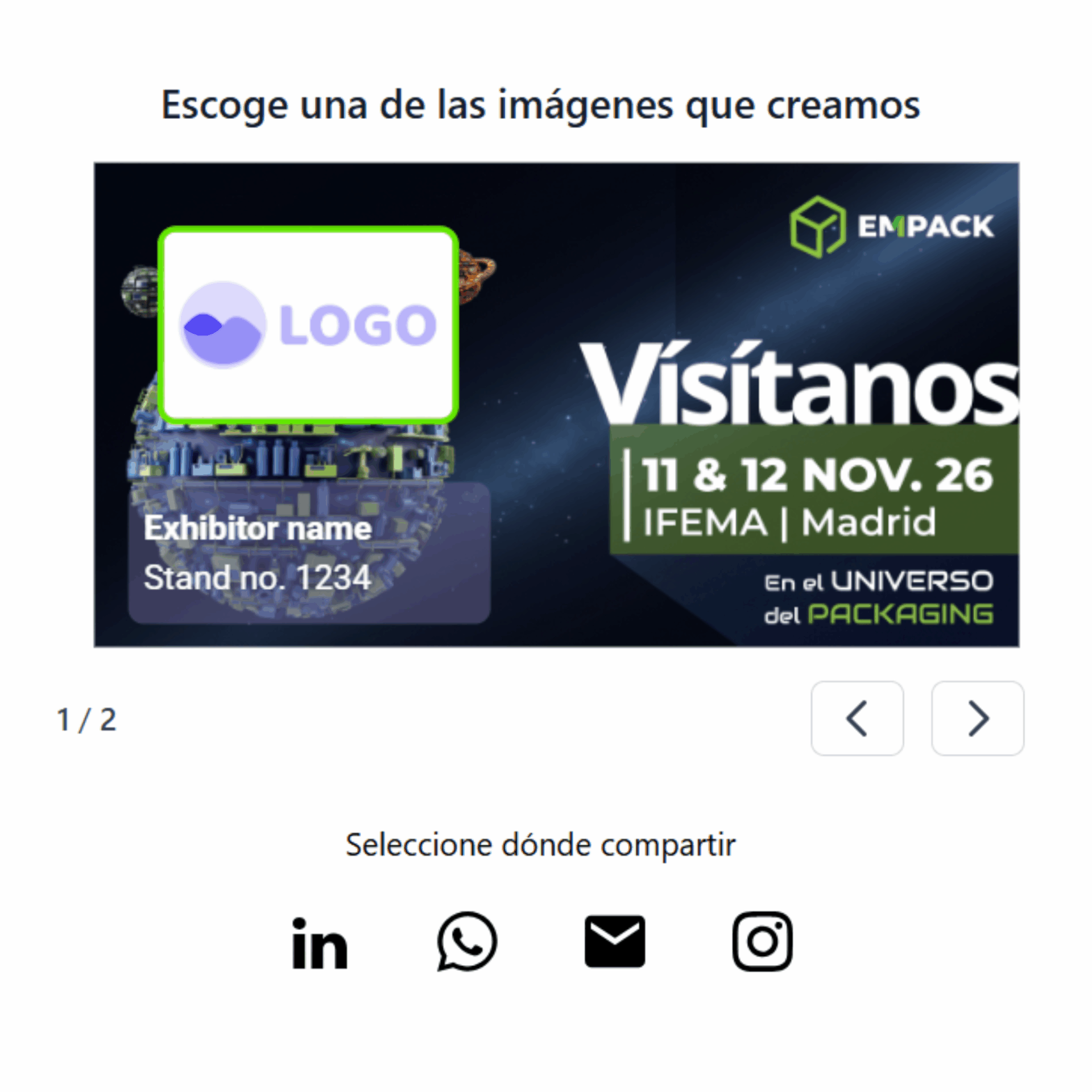
EMPACK CARD TO SHARE ON SOCIAL MEDIA
A more visually appealing version of your invitation link. Designed for sharing on social media and announcing your attendance.
We’ve sent it to you by email, but if you can’t find it, please get in touch and we’ll send it to you again.
DIGITAL INVITATION SERVICE
(Leave it to us)
Don’t have time?
We’ll take care of everything for you:
Upload your database to MyEasyfairs, we design the email, and we send the campaign on your behalf.
DIGITAL INVITATIONS
(if you prefer to send them yourselves)
*We will send it to you by email starting in September
If you prefer to manage it internally:
We will provide you with a ready-to-use email template.
You just need to copy and paste it into your email marketing tool (Salesforce, Outlook, etc.) and send it to your contacts.
The sooner you start sending out invitations, the better the results you’ll get
Don’t leave it until the last minute: Exhibitors who engage their community in advance are the ones who generate the most leads.
Register your staff
There is no need to register for the build-up or dismantling periods.
Instructions to register the staff attending during the show days:
- Access to MyEasyfairs.
- Click on MANAGE STAND and then on MANAGE YOUR STAFF IN VISIT CONNECT.
- Click on TEAM > ADD STAFF
Turn visitors into contacts (leads)
During the trade show, you will have several ways to capture contacts and generate business opportunities.
The more interactions you have, the more leads you will generate, allowing you to follow up more effectively after the event.
💡 You have two key tools available: one works automatically, and the other can be used actively by your team.
Smart Badge Reader
It’s a tool that works automatically. Simply place the scanner at your stand and it will start collecting the contact details of anyone who scans their badge against it, you don’t need to do anything else.
HOW IT WORKS: When a visitor scans their badge: They are registered as a contact, automatically receive information about your company (as entered in your MyEasyfairs profile) and are saved in the database, which you will receive once the event has ended and you have handed the reader back to the organisers.
Empack & Logistics App
This tool allows you to actively capture leads in a more personalised way.
Your team can use it directly on their mobile phones and interact with visitors in real time.
WHAT YOU CAN DO: Scan badges, create customised forms to qualify your leads’ information, add notes for each contact and categorise leads.

Ideally, you should combine both:
- Smart Reader → automatically generates volume
- App → promotes quality
This is how you maximise results during the trade fair
💡 You have two key tools: one works automatically and the other you can use actively.
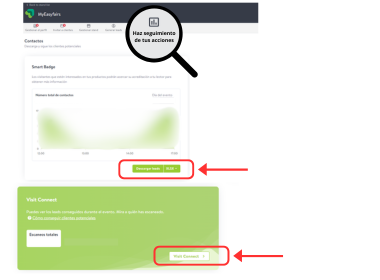
Once the show is over... How do I get my list of contacts?
You will automatically receive an email, but don’t worry if you don’t receive it, you can access My Easyfairs directly and download it from the tab: Track your performance.
*You will have two different databases: one generated through the Readers and another one generated through the App.
Live Tours
COMING SOON
These are guided tours for small groups of visitors, who will visit different stands over the course of one hour to discover, through short demonstrations, the most innovative products or services within specific areas of interest.
An ideal opportunity to create direct impact.
📅 To participate, simply complete this form before 8 October.
Best ESG Exhibitor Initiative
COMING SOON
A recognition for exhibitors who have developed the most outstanding ESG initiative within their organisation.
You can find all the details in the information dossier here.
To participate, simply complete this form before 8 October: COMING SOON
We encourage you to take part and showcase your company’s commitment to sustainability, social impact, and good governance.
If you have any questions, we will be happy to help you.
Set-up and Event Dates and Times
- Set-up (FLOOR STANDS ONLY):
- 8 November: 3.00 pm to 8.00 pm.
- 9 and 10 November: 9.00 am to 8.00 pm.
- Set-up (MODULAR STANDS):
- 9 November: 3.00 pm to 8.00 pm.
- 10 November: 9.00 am to 8.00 pm.
- Event (exhibitors):
- 11 November: 9.00 am to 7.30 pm.
- 12 November: 9.00 am to 6.30 pm.
- Event (visitors):
- 11 and 12 November: 9.30 am to 6.00 pm.
- Dismantling:
- 12 November: alongside the organisers from 7.00 pm to 9.00 pm.
- 13 November: from 9.00 am to 3.00 pm.